 RWF
 KES - Kenya
 UGX - Uganda
 TZS - Tanzania
 NGN - Nigeria
 ZAR - South Africa
 USD - Zimbabwe
 GHS - Ghana
 ETB - Ethiopia
 ZMW - Zambia
 USD - International

Schools in Rwanda increasingly collect fees digitally, and parents expect clear invoices and receipts on their phones.
These tips help the school office match that expectation without extra workload.
Put the fee schedule in one place
When fees live in a document, a spreadsheet and the bursar’s memory, they drift apart. Write the schedule once, per level and per term, and make it the only source the office uses.
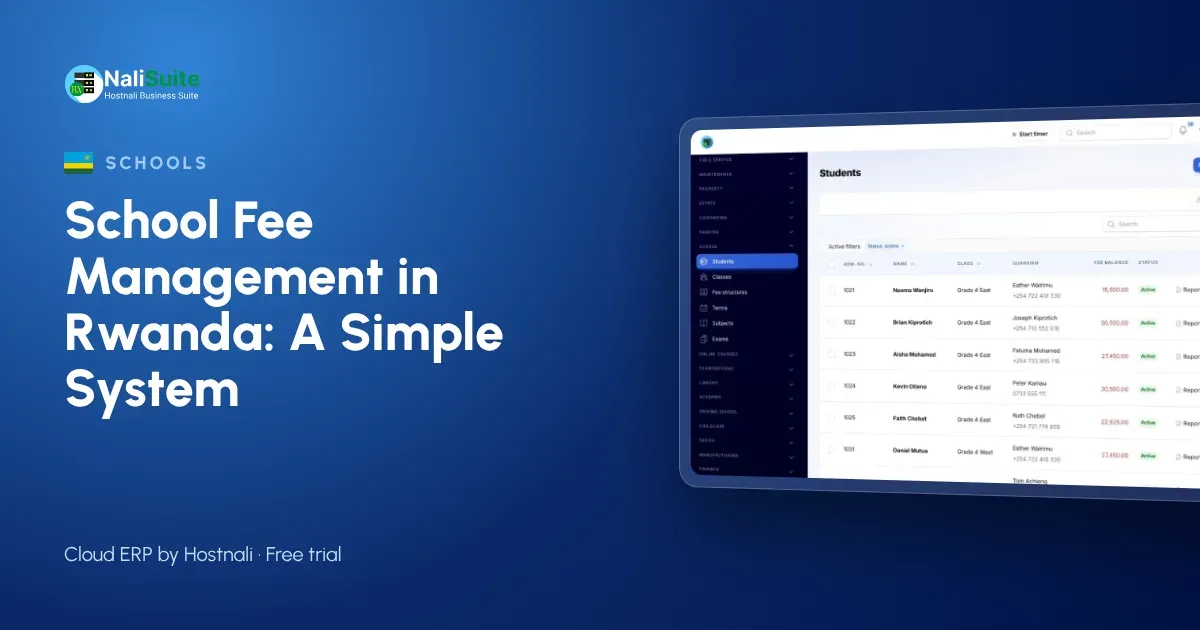
With the School Management add-on, each level has its fee structure, and siblings or bursary students get their discount on the invoice. Any change applies to every child in that level from the next term.
Be clear about instalments and discounts
Many families pay in instalments, and that is fine as long as the plan is agreed and visible. Record the agreed dates, show the remaining balance on each statement and send reminders before each instalment falls due. Record every discount with its reason, so the board can review the total given each term.
Make term invoices automatic
Typing invoices one by one each term wastes days of office time and creates mistakes. If the fee structure is right, the invoices can be produced for every student at once and reviewed before they go out.
Invoices carry the items, any discount and the previous balance, and go to parents by email or WhatsApp with a link to pay by MTN MoMo or Airtel Money, card or bank transfer.
Notes for Rwandan schools
Parents commonly pay by MTN MoMo or Airtel Money. Sending a pay link with each invoice means the payment arrives with the right reference.
Student and parent data is protected under Law No. 058/2021, supervised by the National Cyber Security Authority (NCSA); use individual logins for office staff.
Collect fees without chasing every parent by phone
Phone calls are the most expensive way to collect fees. Most parents pay when reminded at the right time with an easy way to pay.
Parents pay by MTN MoMo or Airtel Money, card or bank transfer; the payment lands on the right invoice without the bursar matching receipts by hand. Balances per student and per class show where to focus, and statements show each family what they have paid this year.
Common problems and how to fix them
| Problem | Fix |
|---|---|
| Parents dispute balances | Statements showing every invoice and payment |
| Payments cannot be matched | Pay links and invoice references |
| Late invoices | Term invoices raised in one click from the fee structure |
| Office overwhelmed at term start | Invoices sent before opening day |
| Salaries paid late | Daily view of collections next to payroll |
Give parents their own page
Parents want to see fees, results and attendance without calling the school. A parent page answers most questions before they reach the office.
Through the Customer Portal, parents see their child’s information, invoices and statements, and pay online. Results produced in the Exams add-on can appear there too as PDF result slips.
Example: a private school in Huye
A private school in Huye with nursery and primary sections now raises term invoices from fee structures per level. Parents pay by MoMo from the invoice link, and the head teacher sees balances by class each morning. Report cards come from the same student record.
Pay teachers on time
Late salaries damage morale quickly, and they often happen because the school is waiting for fees. Knowing collections daily lets the bursar plan the payroll with confidence.
Teaching and support staff can be paid through NaliSuite Payroll, with payslips by email or WhatsApp and bank payout files. Salaries post to the books, so the board sees fees in and salaries out in one report.
A simple rollout plan
- Import classes, students and guardians.
- Set fee structures per level, with discounts.
- Import opening balances.
- Send term invoices with pay links.
- Add registers, exams and the parent portal next term.
Frequently asked questions
Can parents pay by MTN MoMo?
Yes. Parents pay by MTN MoMo, Airtel Money, card or bank transfer, matched to the invoice.
Can we run payroll with RSSB contributions?
Yes. Payroll works out PAYE and RSSB contributions at the rates you set.
Is the school module an extra cost?
School Management and Exams are add-ons to any NaliSuite plan, so you pay only for what you use. Plans start from RWF 3,500 a month.
Can we start in the middle of a term?
Yes. Import students and opening balances, set the fee structure for the next term and carry the balances forward.
Try NaliSuite
NaliSuite brings fees, registers, exams, payroll and accounts into one system for schools. See how it works for schools and colleges, then start a free trial and add the School Management add-on. Plans start from RWF 3,500 a month; compare the plans.